
Account area · after sign-in
My 99 Exchange — Clear Wallet Screen to Follow Every Bet
Track your balance, your exposure and every open bet from one place: my 99 exchange is the account area that opens once you sign in with a 99Exch User Name and Password. The same screen holds the statement, the password change and a withdrawal form that starts at ₹100.
- Type the two fields the 99Exch desk issued to you.
- Open the account area: balance, exposure, bets, statement.
- Withdraw from ₹100, or trace where a stake went.
My 99 Exchange Login — Secure 99Exch Entry to the Wallet
Two fields. That is all the 99Exch sign-in asks for before the account area opens, plus a reCAPTCHA tick underneath them.
Password gone? The Password Issue desk returns a temporary one; the 99Exch login page covers that reset and the OTP option.
My 99 Exch Dashboard — Five Clear 99Exch Tiles, Read One by One
Most people who type my 99 exch into a search bar are not looking for a new account. They already have a 99Exch ID, they placed something last night, and now they want to know three things fast: how much money is left, how much of it is tied up, and whether a payout can go out today. The account area answers all three, but only if you know which tile does which job.
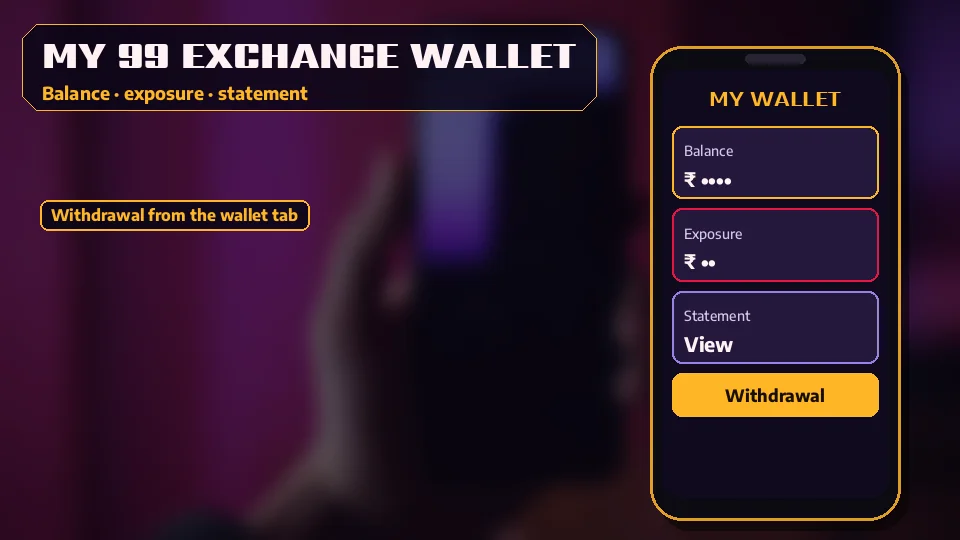
Below is a replica of that screen. The amounts are blanked on purpose, because yours will differ and we do not print made-up numbers.
Money you can still use. Deposits land here, settled wins land here, and a withdrawal comes out of here. If it looks short, check Exposure before anything else.
The amount held against bets that have not settled yet. It is your worst case on those markets, set aside so you cannot spend it twice.
Every back or lay that is still live: the match, the selection, the price, the stake. Unmatched orders sit here too until they match or you cancel them.
The running record. Each deposit, each payout and each settled bet becomes a line with a date, so the balance can always be rebuilt from it.
The payout form. Pick a method, type an amount of ₹100 or more, confirm. UPI, PayTM, PhonePe and bank transfer are the four routes.
Read them left to right and the logic of 99Exch's wallet becomes fairly plain. Balance is what is free, Exposure is what is parked, Open bets explains why it is parked, Statement explains how you got here, and Withdraw is the exit. A lot of the panic messages the 99Exch desk receives (we see them at every hour, since the desk runs 24/7) come from someone reading Balance alone and forgetting the tile right next to it.
There is also the question of timing. A tile is only as current as the last refresh, and during a fast session the figures on 99Exch can trail the action by a moment. If a wicket falls and you are watching Exposure, give it a few seconds, reload once, and read again before deciding anything.
Short version: Balance plus Exposure is roughly what you would hold if every open market settled at your worst outcome and nothing else changed. If those two together still look wrong, the Statement is where the the gap shows up, line by line, on 99Exch.
Open My 99Exch on a Phone or Laptop — Easy 99Exch Routes In
Same account, same balance, two kinds of screen. Whether you search my 99 exchange login on an Android phone at a bus stop or on a laptop at home, the sign-in is identical: User Name, Password, reCAPTCHA, done. What changes is how much of the account area fits on one screen.
Phone view of the 99Exch account — quick checks
Tiles stack in a single column, so Balance and Exposure sit one above the other. Good for a fast glance during a match. Android users can also install the app from the Download .apk button on the sign-in card; the 99Exch app page lists what lives inside it, wallet included. iPhone owners use the browser and pin the page to the home screen.
Laptop view of the 99Exch account — best for the statement
More rows per screen. If you are reconciling a week of bets against deposits, this is where you want to be, because the statement table stays readable without endless scrolling.
One small trap. A Google Play listing named MY 99 EXCH shows up for some of these searches, and we have not been able to confirm it belongs to the exchange; the 99Exch APK page explains which file comes from the sign-in card itself. Until that is cleared up, keep your 99Exch password inside the official sign-in and nowhere else.
What does a blocked address do to the account area? Nothing at all. Indian ISPs shut betting addresses from time to time and 99Exch answers by running several mirrors, so when one page stops loading, you open another and find the identical Balance tile, the identical Exposure figure and every open bet exactly where you left it. Ask the desk which mirror is answering today.
A practical habit for switching addresses: type the username yourself on the new mirror rather than trusting a browser autofill that was saved for the old one. Autofill tied to a dead address simply stays empty, and plenty of people read that blank field as a lost account. It is not lost. The 99Exch account is the same one, it just needs the two fields typed again.
Exposure, P&L and Liability in My 99 Exchange — Clear 99Exch Terms
Three words on the 99Exch account screen cause more confusion than the rest put together. Here they are in plain language.
- Exposure
- The total amount the exchange holds back across all your unsettled markets. It is not a loss yet. It is the most you could lose on those markets as they stand right now.
- Liability
- The figure for one bet on its own. Lay ₹100 at 3.0 and it reads ₹200; back ₹100 at any price and it reads ₹100. Exposure is these single-bet figures netted across a whole market.
- P&L
- Profit and loss, usually shown per market and per selection. Before settlement it is a projection; after settlement it becomes a line in the statement.
- Available
- What is left once exposure is taken out. This is the figure the withdrawal form actually checks against.
A worked example makes it stick, so take the smallest amount 99Exch accepts. You lay one team for ₹100 at a price of 3.0. If that team wins, you pay out ₹200 (the ₹100 stake times two), so ₹200 moves into Exposure the moment the bet matches. Your Balance tile may not look any diferent, depending on how the screen splits the figures, but the amount you can withdraw has dropped by exactly that ₹200. When the match settles, the ₹200 either returns to you along with the backer's ₹100 stake, or it goes, and Exposure goes back to zero for that market.
Backing works the other way round and is simpler. Back for ₹100 and the liability is ₹100. Nothing more.
Where it gets messy is when you hold both sides of a market on 99Exch. Exposure is then worked out on the net position, not on each bet added together, so a hedge can actually shrink the held amount. That is the theory, anyway. In practice the number on screen updates when the opposite order matches, not when you place it, so for a few seconds (sometimes longer on a busy over) it can look as if the hedge did nothing at all.
A second, quicker check for the same idea. Suppose you backed a team for ₹100 earlier and later lay the same team for ₹100 at the same price. Your outcome is now flat whichever way the match goes, so Exposure for that market should fall to roughly nothing once both orders are matched, even though two bets are listed under Open bets. If 99Exch still shows the full amount held, one of the two has not matched yet.
Open Bets and the Statement in My 99 Exchange — Real 99Exch Records
If Balance is the headline, the statement is the full article. Every movement in a 99Exch account turns into a row, and the rows are what the desk will ask about when something does not add up.
| Event in the account | What the row should tell you |
|---|---|
| Deposit credited | Amount, date and time, and the method you paid by |
| Bet matched | Market, selection, back or lay, price, stake |
| Bet settled | Result and the profit or loss that hit the balance |
| Market voided | Stake returned; no win, no loss |
| Withdrawal sent | Amount, method, and the reference you can quote |
Open bets is the part of the record that has not happened yet. Two kinds of row there earn a second look. Unmatched orders hold nothing today but will pull money into Exposure the second another punter accepts them. Bets on an abandoned match wait for the void settlement, and the 99Exch terms confirm that a voided market hands the stake back.
Composite case from the desk: a player sees ₹100 less than expected after an evening of cricket. The statement shows a lay that matched late, during a rain break, at a price he had forgotten placing. Nothing was missing. It was just parked in Exposure.
So before you message anyone, scroll the statement to the time the balance last looked right and read downward. Nine times out of ten the row that explains it is right there, though it is hard to say that to someone who is already worried. The tenth time, copy the row and send it; the 99Exch desk works faster from a row than from a description.
On a a laptop, a full reconciliation takes perhaps ten minutes. Note the balance at a point you trust. Add every deposit row after it, subtract every withdrawal row, then add or subtract each settled result. Whatever you end up with, minus current exposure, should match the available figure on 99Exch to the rupee. If it does not, the difference is one specific row, and that row is what you send to the desk.
Withdraw From My 99 Exch — Fast 99Exch Payout Form, Step by Step
The withdrawal form is the part of the account area people care about most, and it is short. Five moves on 99Exch:
- Sign in and open the wallet section of the account area.
- Choose Withdrawal rather than Deposit.
- Pick a method: UPI, PayTM, PhonePe or bank transfer.
- Type an amount of ₹100 or more, no higher than your available figure.
- Confirm, then watch the statement for the withdrawal row.
The amount field checks against what is available, not against Balance, which is where the exposure lesson from earlier pays off. If you try to pull out a figure that includes money held on open bets, the form will refuse it, and that refusal is correct rather than a fault. Settle or cancel the open orders first, or ask for less.
Payout speed depends on the method you pick. UPI and e-wallets are quicker than a bank transfer, and the payout timings on the 99Exch deposit page are listed route by route; we will not repeat them here. If a payout seems slow, the Withdrawal desk on WhatsApp is the one to message, and the 99Exch WhatsApp number page shows how to reach it (the number is +91 81097 11726, text only).
- The amount is ₹100 or more.
- It fits inside the available figure, after exposure.
- The UPI ID or bank account is in your own name.
- No unmatched orders are still waiting to grab funds.
That last point catches people. An unmatched lay placed an hour ago can match while you are filling in the form, push exposure up, and leave the requested amount suddenly too big, which looks like a glitch on 99Exch but is simply the order doing what it was told.
If a payout is late, a message with four details gets the quickest reply: your 99Exch username, the amount, the method, and the time you pressed confirm. A screenshot of the withdrawal row in the statement helps too. Skip the password; the desk never needs it, and nobody should ask for it.
One request per payout, ideally. Sending the same withdrawal three times because the first one looked stuck usually means three requests the desk has to untangle, and the 99Exch balance can end up looking even stranger in the meantime.
My 99Exch Password Change and Balance Fixes — Safe 99Exch Checks
Passwords first. Whatever string the desk sent alongside your new username was meant to be used once, so replace it inside the account area on day one with something that has never protected anything else of yours. The option stays in the settings afterwards, and the 99Exch new ID page covers how the username itself gets issued.
Then there are the moments when the screen and your memory disagree. The common ones, roughly in the order we see them:
- Balance unchanged after a bet: the order is probably unmatched. Look in Open bets.
- Balance lower than expected: check Exposure, then the statement rows since your last check.
- Statement shows no row for a payment you made: the credit still needs matching (see the paragraph below).
- Withdraw button refuses the amount: it exceeds the available figure or sits under ₹100.
- Sign-in rejected after a reset: use the newest temporary password, then change it again.
The missing deposit is the case that worries people most, so a little more on it. When money leaves your UPI app but does not appear in the 99Exch balance, the payment usually exists; it just has not been matched to your username yet. Every UPI transfer carries a UTR, a reference number shown in the payment app's transaction details. Send that number, or a screenshot that shows it, to the Deposit Issue desk along with your username, and the credit can be traced against it. Do not pay a second time while you wait. A double payment is harder to sort out than a late one, and the 99Exch deposit steps show the order things should happen in.
None of these needs a new account. The username is tied to one balance, and that balance follows you across every working 99Exch mirror, which is also why an ID should never be shared; the 99Exch ID page explains what a single username covers, from sports to casino tables.
One more thing, half a tangent. If 2FA is switched on inside your account, sign-in will ask for an OTP as well, and that code goes to you, never to the desk. Nobody at 99Exch needs it. Not once.
Where my 99 exchange login sits on this balance page — easy 99Exch notes
On 99Exch, a search for my 99 exchange login ends at the same two-field card as every other sign-in; nothing separate exists for the account area. What differs is where you land afterwards: the my 99 exchange screen, with balance, exposure, open bets and statement together, instead of the match lobby.
Three habits keep that screen readable for anyone checking it on a phone between overs:
- Read Balance and Exposure together, never Balance alone.
- Scroll the statement from the last time the figure looked right.
- Withdraw only the available amount, ₹100 at the very least.
How my 99exch and my 99 exch searches reach the same 99Exch wallet — clear map
Whether you type my 99exch as one word or my 99 exch with a gap, the destination is the account behind your 99Exch username, not a separate site or a separate app. The spacing changes nothing about the balance you will see.
From here, the deposit page has the payout timings, the login page has the password reset, and the WhatsApp page lists the four desks that answer around the clock.
My 99 Exchange Questions — Verified 99Exch Answers
What does exposure mean in my 99Exch account?
It is the figure on the Exposure tile beside Balance: rupees parked against your unsettled markets, sized to the worst result each one could give you. You cannot withdraw that money or stake it again. When a market settles, its share either comes back into Balance or is lost, and the market drops off the tile.
Where do I find the account statement on 99Exch?
The statement sits inside the account area that opens after you sign in, next to Balance, Exposure and Open bets. It lists every deposit, withdrawal and settled bet as a dated row. Scroll back to the last time your balance looked right and read forward to find any change you did not expect.
How do I withdraw money from my 99Exch account?
Four inputs do it: the Withdrawal option in the wallet, one of UPI, PayTM, PhonePe or bank transfer, an amount from ₹100 upward, and a confirm tap. The amount cannot exceed what is left after exposure. For a payout that seems late, text the Withdrawal desk your username, the amount and the time you confirmed.
Why has my 99Exch balance not changed after a bet?
Most often the bet is still unmatched, so nothing has been held yet. Check Open bets: an unmatched order waits there until someone takes the other side or you cancel it. If it is matched, look at Exposure, because the held amount may be shown there rather than taken off the balance figure.
Can I change my 99Exch password from inside the account?
Yes. Do it whenever someone else may have seen the password, and every time you have just used a temporary one. Set the new one in the account settings, then sign out and back in once to prove it works before a match starts. Already locked out? That becomes a job for the Password Issue desk.