
99Exch sign-in and password help
99Exch Login — Easy Entry Plus a 1-Minute WhatsApp Reset
Stuck on the 99Exch sign-in card? Usually the fix is one of two. Either type the desk-issued User Name, not your mobile number, plus the password and wait for the reCAPTCHA tick, or ask the Password Issue desk on WhatsApp for a temporary password in about a minute. Login with Demo ID needs no deposit.

99Exch Login Card Replica — Quick Check Before You Type
Same layout you meet on a working 99Exch address: one box for the name, one for the secret, a reCAPTCHA under them. Nothing else gets typed.
Both boxes filled first; the reCAPTCHA tick comes after, below the two buttons
Lost the Password? New One Back in About 1 Minute99 Exch Login Screen: Two Clear Fields and a reCAPTCHA Tick
Most people who search 99exch login are standing in front of the sign-in card already, a little unsure what goes where. Fair enough. On every 99Exch mirror we checked on 9 Oct 2026 the card asks for exactly two things, User Name and Password, and then puts two buttons below them: Login, and Login with Demo ID. Under those buttons sits the reCAPTCHA note.
That is the whole screen. No mobile number box, no email box, no OTP box by default.
On the 99Exch card · what goes in · common slip
User Name · the username the desk issued on WhatsApp · typing a mobile number instead
Password · the temporary one from the desk, or the one you set later · a stray space at the end
reCAPTCHA · a tick, sometimes a picture puzzle · pressing Login before it finishes
Login button · opens your real 99Exch wallet and lobby · works on any tested address
The User Name trips people up more than the password does. Plenty of betting sites sign you in with a phone number, so the habit is strong, but a 99Exch username is a handle the desk creates for you when the ID is made, and the card will not recognise a ten-digit number typed in its place. If you have lost track of the username, scroll back through the WhatsApp chat in which the ID arrived; it is usually the first thing the desk sent.
Passwords are less dramatic. Retype it slowly, watch for autocorrect capitalising the first letter on a phone keyboard (this happens a lot), and check the keyboard has not flipped to another language.
Then the reCAPTCHA, which on a slow connection can take a few seconds to become a tick. Press Login during that gap and the card simply reloads. It feels like a rejection, though the details were never checked.
One more 99Exch habit worth breaking: letting the browser fill the card for you. After a reset the browser often still holds the old password and drops it into the box without asking, so the card refuses details you never actually typed. Clear the saved entry, or type over it, and the new 99Exch password goes through.
Already signed in on the 99exch.com sign-in path? The 99Exch com login page covers that exact address and its buttons; the boxes and your credentials are identical there.
99Exch Demo ID Login — Free Practice Without a Deposit
Second button on the card, the one many people never press. Login with Demo ID opens 99Exch with a practice balance attached, and it asks for no username, no password and no deposit at all. You land in the lobby, you click around, you place a few pretend bets on a cricket line or a casino table, and nothing touches a rupee wallet.
Why bother? Mainly to learn where things sit before real money is involved. Back and lay columns, the bet slip, the way a session line is laid out on 99Exch: all of that is easier to learn when a mistake costs nothing.
It is practice. Not an account.
A demo session holds no deposit history, no withdrawal method and no saved password, so there is nothing for the the desk to reset if you close it. When you want the real thing you need an actual 99Exch ID, and the 99Exch new ID desk sets that up over WhatsApp.
Press Login with Demo ID on the 99Exch card → practice balance loads → browse sports and casino rooms freely.
No deposit, no username. Money in or out only ever happens on a real ID.
One small trap. People sometimes press the demo button by accident, see a balance they do not recognise and assume their own 99Exch account has been changed. It has not. Sign out, press the plain Login button instead, and type your own two details; your actual wallet appears as you left it.
99Exch Login Password Reset Ladder — Four Safe Rungs
A wrong password is not one problem; it is four slightly different ones, and each has its own fix. Start at the bottom rung and climb only as far as you need to. Most 99Exch users stop at rung one or two.
- 01Wrong password onceRetype it slowly, check the first letter, clear any trailing space. Confirm the 99Exch username is the desk-issued handle and not your phone number.
- 02Refused againLet the reCAPTCHA finish, then try on a different tested 99Exch address. Same ID, same balance, so nothing is lost by switching.
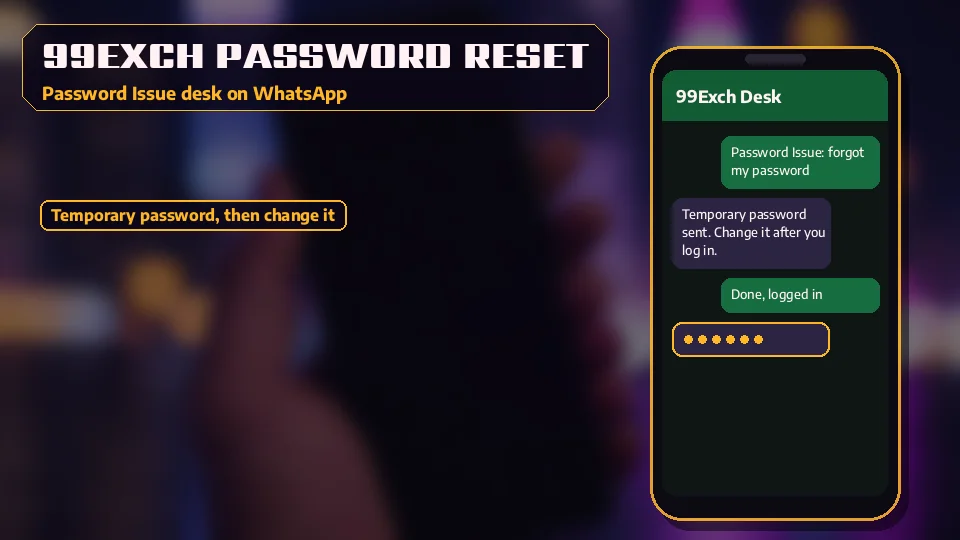
- 03Password simply forgottenWrite the 99Exch username into a WhatsApp chat with the Password Issue desk, +91 81097 11726. That single line is the entire request.
- 04Password Issue desk resets itA temporary password comes back in about a minute. Sign in with it, then set your own from inside the account.
Rung three is where people waste time. Guessing at a forgotten password over and over, from memory, from old notes, from a sibling's suggestion, achieves very little, while a single message to the 99Exch Password Issue desk gets a temporary password back in roughly sixty seconds.
Your username is the only line a 99Exch reset needs. Nothing from the old password, no code from your phone. Which of the four desks is which? The 99Exch WhatsApp number page lays them out by name.
Back on the card with the new password, the order does not change: username, password, reCAPTCHA, Login. People half expect a reset to bring a different screen. It does not.
99 Exchange Login Errors Decoded — Fast Fixes That Work
Here is what usually goes wrong on the 99 exchange login card, sorted by what you actually see on the screen rather than by any technical cause.
| What you see | Likely reason | What to do on 99Exch |
|---|---|---|
| Card refuses the details | Phone number typed as username, or a typo in the password | Use the desk-issued username; retype the password |
| Card reloads, nothing happens | Login pressed before the reCAPTCHA finished | Wait for the tick, then press Login once |
| Address will not open at all | That domain is blocked on your network | Try another tested 99Exch address; same ID works |
| A hosting error page instead of a card | No site lives at that address | Leave it; never type a password there |
| An OTP box you never saw before | 2FA switched on inside the account | Enter the OTP, or ask the Password Issue desk |
| Strange balance after signing in | Demo button pressed by mistake | Sign out, use the plain Login button |
If two rows seem to fit at once, start with the top one; a mistyped username explains more refused 99Exch sign-ins than anything further down the table.
Row four deserves a word. In our 9 Oct 2026 check, 99exch.io answered with a hosting mesage saying no deployment exists, which means there is no 99Exch card there at all; the 99Exch io status page keeps that result dated. Any lookalike that asks for your password on an untested address gets nothing from you.
For signing in, a blocked address changes where you type, never what you type. Indian networks block betting domains every so often; the same 99Exch username, password and balance simply open on whichever mirror is up that night.
Where 99exch login and 99 exch login point on this real card
Whether you type 99exch login, 99 exch login or 99 exchange login into a search bar, every spelling ends at the same two boxes. The username comes from the desk, the password is temporary at first and yours afterwards, and the reCAPTCHA sits below the buttons.
Play 99 exch com login and play 99 exchange login, read as official addresses
| Search typed | What it really means |
|---|---|
| play 99 exch com login | The sign-in on the play99exch.com address |
| play 99 exchange login | Same ID, any working play address |
| play 99 exch login | Same two boxes, same reCAPTCHA |
Play 99 exch login password versus 99 exchange login password on a fast reset
- play 99 exch login password: one password, valid on every tested address
- 99 exchange login password: reset by the Password Issue desk, not the card
- a password changed on play99exch.com is already changed on every other mirror
Quick 99Exch terms used across this sign-in page
- Desk-issued username
- The handle you type into User Name, not a phone number.
- Demo ID
- Practice balance from the second button, no deposit.
- 2FA OTP
- Appears on the card only for accounts that turned 2FA on themselves.
Every term above belongs to 99Exch sign-in and nothing else on this site.
99Exch Login OTP — Only When Secure 2FA Is Switched On
A lot of searches about the 99exch login OTP come from people waiting for a code that was never going to arrive. By default the 99Exch sign-in card has no OTP step. Two boxes, a reCAPTCHA, done.
An OTP enters the picture only if 2FA has been switched on from inside the 99Exch account, after you have already signed in at least once. Once that switch is on, a code is asked for after the password; if it is off, there is no code anywhere in the flow, and waiting for an SMS that will not come just wastes a few minutes.
- No OTP box on the card? 2FA is off. Use username and password only.
- OTP box showing but no code? Ask the Password Issue desk for help.
- Someone on chat asking you for an OTP? Do not share it; the desk does not ask.
Switching 2FA on, or off again later, is a setting inside the 99Exch account. The sign-in card itself has no toggle for it.
When the OTP box does appear, it belongs on the 99Exch sign-in card and nowhere else. A code pasted into a chat window does nothing for your login, and the 99Exch privacy policy lists OTPs among the things the desk never collects.
First 99Exch Sign-In With a Temporary Password — Easy Steps
This sequence covers two evenings: the one when a brand-new 99Exch ID arrives, and the one right after a reset. Both begin with a password somebody else chose for you. No ID at all yet? The 99 Exchange sign up steps explain how one gets made.
- Open a tested 99Exch address or tap a sign-in button on this site.
- Copy the username from the desk message into User Name, letter for letter.
- Paste or type the temporary password into Password.
- Wait for the reCAPTCHA tick, then press Login, not Login with Demo ID.
- Check the wallet balance loads, then set your own password in the account.
Five steps, a minute or two. Step five is the one that gets skipped, because everything already works and the temptation is to go straight to the lobby, but a temporary password sitting in a chat thread is exactly the kind of thing that leaks, so change it while the chat is still open in front of you.
Copy-pasting from WhatsApp has one small catch: phones sometimes grab a trailing space or a full stop along with the password. If the card refuses a pasted 99Exch password, type it out by hand instead.
A typical exchange looks like that one: short and dull, which is how it should be.
Play 99 Exch Login and Play 99 Exchange Login Password — Same Real ID
Plenty of people know 99Exch through a play address instead of the plain one. Searches like play 99 exch com login, play 99 exch login or play 99 exchange login all describe the same sign-in, reached through a diferent domain. In our 9 Oct 2026 check play99exch.com answered with the exchange build, and the play 99 exch login addresses we tested are dated there, one by one.
What matters for signing in is simpler than the address list. One 99Exch username. One password. Valid on every working mirror the desk confirms.
So a play 99 exch login password is not a separate secret, and a 99 exchange login password changed on one address is changed on all of them. People sometimes keep two passwords in their notes because they think two sites mean two accounts. They do not. If an old password stops working on a play address it has almost certainly been replaced by a newer one you set on another 99Exch mirror, probably after a reset.
Unsure which address is up today? Ask the desk rather than trying random spellings; a guessed domain is the most likely place to meet a copycat card.
A short example of how this plays out. Someone signs in on play99exch.com for months, resets a forgotten password on another 99Exch mirror, and the next evening the play address refuses the old one. Nothing is broken; the newer password is simply the only valid one now, on every address.
99Exch Password Desk Ledger — What the Trusted Desk Asks For
Before you message anyone about a 99Exch login problem, it helps to know what a genuine reset conversation contains. Short version: very little.
- Desk to message
- Password Issue, the sign-in desk; the other three deal with IDs and money
- Number
- +91 81097 11726, shown as text on this site
- What you send
- Your 99Exch username
- What comes back
- A temporary password, in about a minute
- Hours
- 24x7, including late-night match finishes
- Never requested
- Your current password, an OTP, card numbers
A reply that asks for more than the username, or pushes you towards a link that is not a tested 99Exch address, is a reason to stop and compare the number with the one printed on this page.
Pick the right desk and the reply is quicker. A deposit that has not shown up belongs with Deposit Issue, a stuck payout with Withdrawal; the Password Issue desk handles sign-in only, and sending a login problem to the wrong desk mostly means one extra hop before someone resets it.
Once you are back in, the My 99 Exchange account page picks up from the moment the lobby opens.
99Exch Account Locked, Renamed or on Two Phones — Safe Real Fixes
Three questions arrive at the 99Exch desk often enough to deserve their own space: a card that keeps refusing after several tries, a username someone wants changed, and an ID used on two phones.
Repeated refusals first. We do not publish a number of attempts after which a 99Exch account stops accepting a password, and you should not try to find out by experiment. After two failed attempts, stop typing and message the Password Issue desk; a reset replaces whatever password the account holds, so the cause of the refusals stops mattering.
Usernames are different. The username is issued by the desk when the ID is created, and the sign-in card has no option to rename it. Want a different handle? Ask the desk what is possible, but keep in mind that the 99Exch terms allow one account per person and can close duplicate accounts, so opening a second ID just to get a nicer name is a bad trade.
Two phones, then. Your 99Exch login is just a username and a password, so the same details type into a second phone the same way they type into the first, and the balance follows the account rather than the device. What the 99Exch terms and conditions rule out is sharing one account between two people.
Your phone, your laptop: fine. Your phone, a friend's betting: not fine.
99Exch Login FAQ — Clear Answers to Seven Sign-In Questions
Where is the official 99Exch login link?
Use a 99Exch address the desk has confirmed, or the sign-in buttons on this site, which open 99exchlogin.com.in. In our 9 Oct 2026 check several 99Exch mirrors showed the same two-box card, and your username, password and balance stay identical on each working address, so the link matters less than the details.
I forgot my 99Exch password. How do I reset it?
There is no reset button on the 99Exch card itself, so the reset runs through WhatsApp. The Password Issue desk at +91 81097 11726 takes your username and sends a temporary password back in about a minute. Sign in with it, then pick your own from inside the account.
What is the 99Exch demo ID login?
It is the second button on the sign-in card, Login with Demo ID. Pressing it opens the lobby with a practice balance, with no username, no password and no deposit. Use it to learn the bet slip and the markets; real deposits and withdrawals only happen on a proper 99Exch ID.
Why is my 99Exch login OTP not coming?
Usually because no OTP is due. The 99Exch card asks for an OTP only when 2FA has been switched on inside the account. If you never turned it on, sign in with username and password alone. If 2FA is on and the code still does not arrive, ask the Password Issue desk.
My 99Exch account is locked after wrong passwords. What now?
Stop retrying after two failed attempts and message the Password Issue desk on WhatsApp with your username. The desk resets the password and sends a temporary one in about a minute, which replaces whatever the account held before. Sign in with it, then set a new password you will remember.
Can I change my 99Exch username?
Not from the sign-in card. The username is issued by the desk when your ID is created, and only the password is yours to change. Ask the desk on WhatsApp if you need a different handle, but do not open a second ID for it, because the terms allow one account per person.
Can I use my 99Exch login on two phones?
Yes, the same username and password type into any phone or browser, and the balance stays with the account rather than the device. Change the password on one and it changes everywhere. What is not allowed is sharing one 99Exch account between two different people; shared accounts can be closed.