
Sign-in desk · address tested 9 Oct 2026
99Exch Com Login — Quick Sign-In on 99exch.com/m/login
Open 99exch.com/m/login, fill User Name and Password, settle the reCAPTCHA prompt, press Login: that is the whole 99Exch sign-in on this address. Indian networks block betting domains now and then, and when this one stalls, the same ID and the same balance carry over to any mirror the desk says is live.
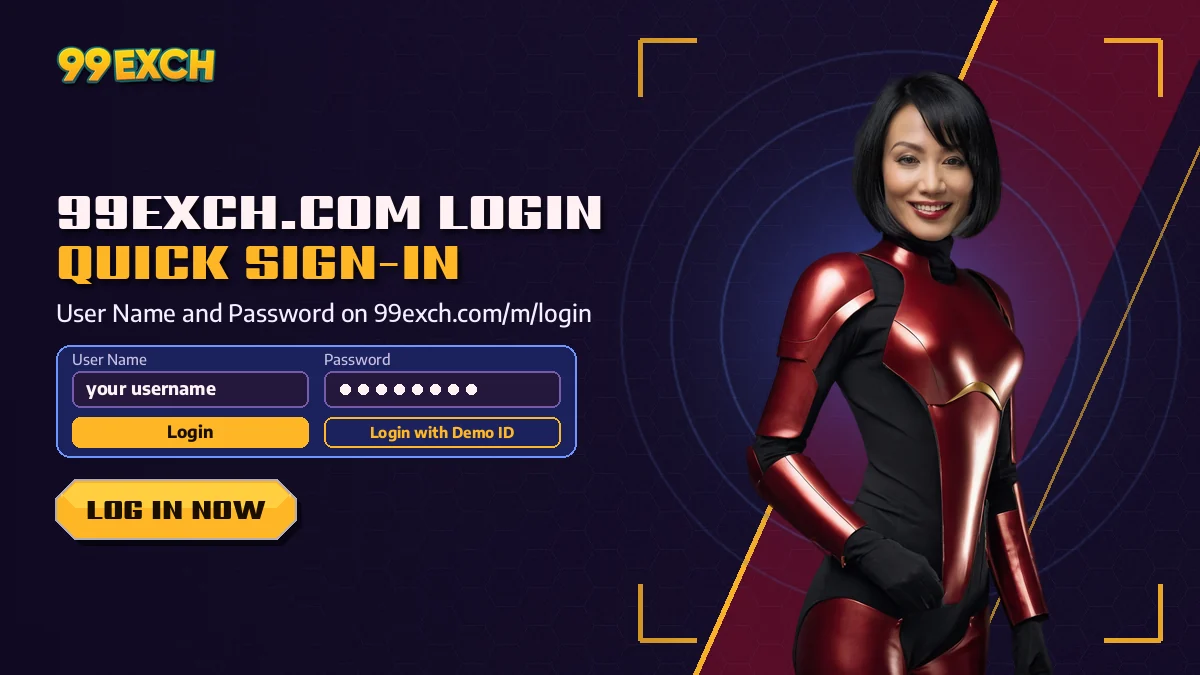
Quick 99Exch Com Login Entry With Two Secure Fields
Same two boxes the real 99Exch card shows. You fill them on the sign-in page itself, not here.
Log In on 99Exch: 2 Fields, Then reCAPTCHAPassword gone? The Password Issue desk on the 99Exch WhatsApp number sends a temporary one back.
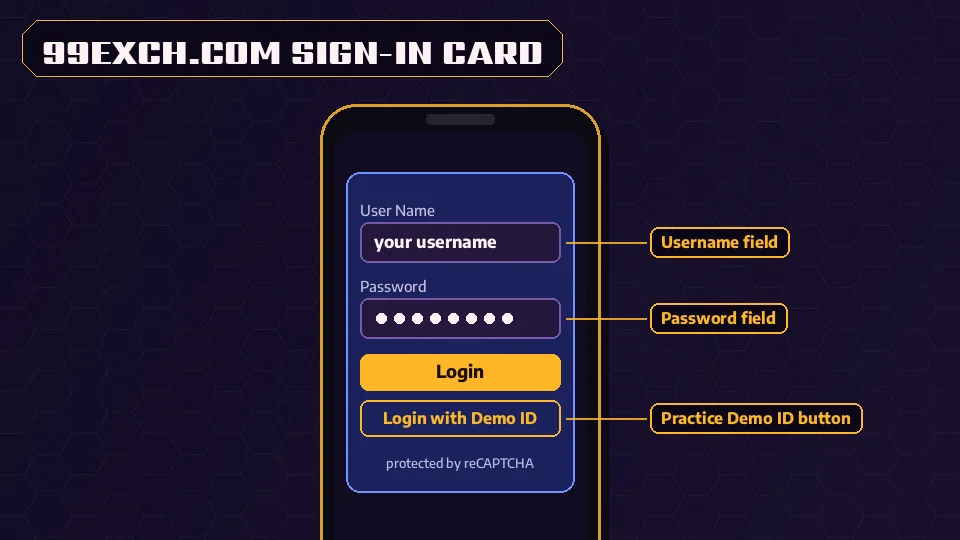
Real 99Exch Com M Login Card, Pinned Part by Part
Most people who search 99exch com m login want to see the box before they type into it. Fair enough. We rebuilt it from our 9 Oct 2026 visit to https://99exch.com/m/login, which answered 200 and put the 99Exch sign-in card straight on screen, with no match rows or lobby in the way.
Pin 1 wants the username as issued. A copy-paste from a chat can drag a trailing space along, and the card reads that space as part of the name.
Your own password if you already changed the temporary one; otherwise the temporary one from the chat.
Sends both fields to 99Exch. Press it once the reCAPTCHA step is settled, and only once.
Opens a practice balance with no deposit and no username of yours. Good for a look around, useless for real stakes.
A small line telling you the card is protected. If it raises a picture puzzle, finish it before you touch Login.
An .apk download, a WhatsApp contact button, a button for sharing the apk, and a contact email line set in capitals.
Six pins, one card. That is all 99exch com login really is on this address: two fields, two buttons, a security check and a strip of extras underneath. The rest of the 99Exch site sits behind it.
The /m/ in the path stands for the mobile layout, which is why the card fits a phone screen without zooming (the lobby at /m/home uses the same trick, see what 99exch com m home shows before sign-in). On a wider screen the same fields simply sit in the middle of the page. Nothing about your 99Exch username changes with the layout, and the balance you see after Login is the one tied to the ID, whichever device or address you used to reach it.
HTTP or HTTPS 99Exch Com Login: Clear Results for Each Address
People type this address in five or six different ways. Some write http 99exch com login because an old bookmark or a forwarded link used plain http; others type https 99exch com login, or https 99exch com m login with the mobile path spelled out, and a fair number search 99 exch com login with a space in the middle because that is how the brand sounds. All of those are aiming at one 99Exch card.
| Address typed | What came back in our 9 Oct 2026 check | Your next move |
|---|---|---|
| http://99exch.com/m/login | Handed over to https, then the same sign-in card | Nothing extra; log in as normal |
| https://99exch.com/m/login | 200, the 99Exch sign-in card | Type both fields |
| https://99exch.com | 200, the exchange lobby with Login in the top corner (more on the 99 exchange com root) | Tap Login, or add /m/login |
| https://99exch.com/m/home | Timed out once, answered 200 on the retry | Retry before you blame the password |
| https://99exch.live | 200, the same card (99exch live login details) | Use it if 99exch.com stalls |
| https://99exch.io | 404, no site at all | Never type a password there |
99Exch address log · 9 Oct 2026, 12:17 IST
99exch.com/m/login 200 · sign-in card
99exch.com 200 · lobby first
99exch.com/m/home first try timed out retry 200
99exch.live · 99exch.red · 99exch.green 200 · same card
99exch.io 404 · nothing hosted
So does http versus https matter? Barely. The http form passes you to https before the card even draws, which means the username, the password and the balance are the same on both; typing https yourself just saves one hop.
Landing on the the lobby by mistake is the most common detour. You typed 99exch.com, the match rows and tabs appeared, and there is no sign-in box in sight. Look to the top corner: the Login link there opens the same User Name and Password card. Bookmark /m/login itself once you are on it, and the next 99Exch visit skips the lobby entirely.
The /m/ part is the same story. With it or without it, you reach a 99Exch sign-in, though the root without any path opens the lobby first and makes you tap Login. That is the theory, anyway. In practice a mobile network that blocks 99exch.com blocks every path on it, and then no amount of retyping helps. You need another address, and the desk is the one who confirms which mirror is answering on a given day. Ask before you guess. A mistyped mirror can be a stranger's page, and the .io row in the table above shows how quickly a lookalike address turns into a dead end.
Easy 99Exch Com Login in Six Moves From a Phone
Here is the order that works on the first try for most 99Exch users. It assumes you already hold a username; if you do not, the New ID desk issues one in about a minute (see how a 99Exch new ID is issued).
- Open https://99exch.com/m/login in the phone browser. Going straight to /m/login skips the lobby and lands you on the card.
- Fill pin 1, the User Name, letter for letter from the chat.
- Type the Password. If it is still the temporary one from the chat, plan to change it as soon as you are inside.
- Finish the reCAPTCHA prompt if one appears.
- Press Login, the main button, not Login with Demo ID.
- Open the wallet and confirm the balance is your real one, not a practice figure.
Step six sounds fussy. It is not. A pattern the 99Exch desk sees fairly often goes like this: someone taps the demo button by accident, sees a practice balance where they expected their deposit, and messages in a panic that the money has vanished, when all they needed was to log out and press the other button.
What happens after a clean 99Exch login? Three small jobs, in this order. Replace a temporary password if you are still on one. Glance at the wallet. Then go where you meant to go, whether that is cricket odds or a casino room; if the wallet is empty, the minimum top-up is ₹100 by UPI, PhonePe, PayTM or a bank transfer, and the 99Exch deposit steps cover the rest.
On a slow connection, give the card a few seconds after step five before tapping again, because a double tap on Login sends the same request twice and you will probably just get bounced back to the empty fields, which looks like a refusal even when the password was right.
99Exch Com Login Not Working? A Proven Error Decoder
Login trouble on 99Exch usualy falls into one of seven shapes. Match what is on your screen to a row, then do only what that row says.
| On your screen | What it usually means | What to do |
|---|---|---|
| Page spins, then times out | The network is blocking the domain, or a slow first request | Retry once, then ask the desk for a working mirror |
| 404 with a hosting message | Wrong address, such as 99exch.io | Go back to /m/login or a confirmed mirror |
| Card loads, Login refuses | A typo in the username, or an old temporary password | Retype slowly; then the Password Issue desk |
| reCAPTCHA keeps asking again | The check was not completed before Login was pressed | Reload the card, finish the check, press Login once |
| Inside, but the balance looks unfamiliar | The demo button was pressed | Log out and use the main Login |
| A lobby instead of the card | You opened the root or /m/home | Tap Login in the corner, or type /m/login |
| A one-time code is requested | 2FA is switched on inside your account | Enter the code sent to you |
Before any password goes in: the address has to be 99exch.com/m/login or a mirror the 99Exch desk has named for you that day. A card that looks right on an unknown domain is still an unknown domain.
The timeout row deserves a word. In our own check, the /m/home path failed its first request and answered on the second, so a single spin is not proof of a block. Two or three in a row, on mobile data and on Wi-Fi alike, is a stronger sign. At that point, message the desk on 99Exch WhatsApp at +91 81097 11726 and ask which address is up.
A worked example makes the mirror switch clearer. Say 99exch.com/m/login spins on your phone late in the evening, on both mobile data and home Wi-Fi. You send one line to the 99Exch desk asking which address is up; the reply names a mirror, perhaps 99exch.live, which showed the same card in our check. You open it, type the same User Name and the same Password, press Login, and the wallet shows the balance you left on 99exch.com. Nothing was moved and nothing needs re-registering, because the account lives with the ID and not with the address bar.
One more case sits outside the table. If the card loads, the password is right and Login still bounces you back, the cause is hard to say from the outside; a screenshot sent to the 99Exch Password Issue desk saves a long back-and-forth.
Free Demo ID or Real 99Exch Com Login: Picking the Right Button
Two buttons, very different results. The 99Exch card puts them side by side, so it pays to know which is which before your thumb lands.
Login with Demo ID
- No username or password needed
- A practice balance, no deposit
- Good for seeing the lobby and the casino rooms
- Nothing won or lost here touches a wallet
Login
- Your own 99Exch username and password
- The real wallet: deposits and withdrawals start at ₹100
- Money in by UPI, PhonePe, PayTM or a bank transfer
- Same balance on every working mirror
Which should you press? If you have never seen the 99Exch exchange screen and just want to to check where cricket odds, the casino rooms and the wallet sit, the demo entry is the free way in. Once you hold a real username, ignore it completely. The 99exch login page covers what the demo button does in more depth, including how it differs from a real ID.
There is a sensible moment for the demo entry even for experienced players: checking that 99exch.com/m/login loads properly on a new phone before you trust it with your real password. If the demo opens, the address and the network are fine, and any later refusal on the main Login points back at the username or password.
A small catch: the demo and the real login look almost identical once you are inside, apart from the balance, and that similarity is exactly why the step-six check above exists.
Secure 99Exch Com Login Password and the Fast Reset Route
The 99exch com login password box is pin 2 on the mock above, and it trips more 99Exch users than the username does. A temporary password gets typed once and forgotten. A self-chosen one gets changed in a hurry, then forgotten too. The card itself gives no hint about which one it expected, so the useful moves happen off the card.
- On a brand-new 99Exch ID, pin 2 expects the temporary password from the chat, and the first job inside is swapping it for your own.
- The one password opens every working address, so there is nothing separate to remember for a mirror.
- Two wrong tries on pin 2 and you are guessing; stop there and message the Password Issue desk, whose reply goes straight into that same field.
- A password goes into a mirror only after the 99Exch desk has named that mirror for the day; 99exch.io, which gave a 404 in our check, should never see it (what the 99Exch desk keeps on record is short, and a password is not on it).
- A one-time code at sign-in appears only if 2FA is switched on inside your account.
Count the moves. One message out to the 99Exch desk, one temporary password back, one sign-in on /m/login with it, one change once inside. Four moves on the same phone, and the 99Exch username stays exactly as it was through every one of them.
Keep the new one somewhere other than the WhatsApp chat. Roughly speaking, anyone who can scroll your messages can read a password sitting in them, and the desk would much rather issue a fresh temporary one than untangle a shared account later; the 99Exch terms on one account per person explain why shared IDs can be closed.
Verified Extras Under the 99Exch Com Login Card
Scroll past the buttons on /m/login and four more things sit below. Each does one job.
- Download .apk
- The 99Exch Android app file. Android only; iPhone users stay in the browser and can add the page to the home screen. Install steps live on the 99Exch APK page.
- Contact On Whatsapp
- Jumps out of the browser into a chat, which helps when the card refuses you: you can say exactly what pin 1 or pin 2 did. Which of the four 99Exch desks to pick is listed on the 99Exch number page.
- Share This Apk to Friend
- Passes the app link on, nothing more. It does not share your username, and a friend who installs from it still needs an ID of their own from the New ID desk.
- Contact email line
- A line in capitals giving an email address for contact. For a login problem, WhatsApp is faster.
Not every 99Exch address carries all four. The .live, .red and .green mirrors showed the full strip in our 9 Oct 2026 check, while 99exch.win showed only the .apk download under its card, with no WhatsApp and no share buttons; the 99exch live mirror page lists what each address showed.
On a laptop the card behaves like any web page. The /m/ path is built for phones, yet the fields and buttons do the same job in a desktop browser, and since the .apk is for Android only, a laptop user simply stays on the web card.
Verified https 99Exch com login result from our 9 Oct check
On 9 Oct 2026 the https 99exch com login address, typed out in full with the /m/login path, gave a 200 and the 99Exch card with its two fields. A plain 99exch com login search is after the same box, which is why the pins above describe it rather than the lobby.
Quick fix when http 99Exch com login or 99 exch com login is typed
Searching http 99exch com login or 99 exch com login with a space still ends at the same card, because the http form hands over to https and the space only exists in the search box. If the card does not load, ask the 99Exch desk for a working mirror instead of retyping.
Fast 99Exch com m login order behind the mobile card
- Open https 99exch com m login, written as https://99exch.com/m/login.
- Enter the 99Exch User Name from the desk chat.
- Enter the password.
- Complete the reCAPTCHA prompt.
- Press Login, not the demo entry.
Safe source of the 99Exch com login password on this card
The 99exch com login password starts as a temporary one from the desk and becomes your own after the first sign-in. Lost it? The Password Issue desk on WhatsApp sends a new temporary password, which you type into the same card at 99exch com m login.
99Exch Com Login Questions: Quick and Trusted Answers
Which link opens the 99Exch com login page?
In our 9 Oct 2026 check the sign-in card sat at https://99exch.com/m/login, answering 200 with the User Name and Password fields. The bare 99exch.com root opens the lobby first, with Login in the top corner. If neither loads on your network, ask the 99Exch desk for a mirror that is answering.
Why is the 99Exch page at 99exch.com/m/login not opening?
On 9 Oct 2026 this address answered 200, so a dead screen on your side points at the network first, since Indian ISPs block betting domains from time to time. Reload once. Still blank on both data and Wi-Fi? Ask the 99Exch desk for a live mirror; your ID and balance work there unchanged.
What does Login with Demo ID do on 99Exch?
It opens the exchange with a practice balance, without a deposit and without your own username. Use it to look around the lobby before playing for real. Nothing under the demo entry is your wallet, so press the main Login button whenever you want your real 99Exch account and balance.
Why does the 99Exch reCAPTCHA check keep failing?
Usually the check was left unfinished before Login was pressed, or the card sat open a long while. Reload the sign-in card, complete the reCAPTCHA prompt fully, then press Login once. If it keeps looping, send a screenshot to the 99Exch Password Issue desk on WhatsApp so they can see what you see.
Should I use http or https for 99Exch com login?
Either works, because the http form hands you over to https and you land on the same sign-in card. Typing https directly saves one hop. The username, the password and the balance are identical on both, and the same holds with or without the /m/ part of the 99Exch address.
I forgot my 99Exch com login password. What now?
First rule out the two look-alikes from the decoder table above: a stray space in the User Name, or the demo button pressed by mistake. If the card still refuses, WhatsApp the Password Issue desk on +91 81097 11726, take the temporary password it sends, and swap it for your own inside 99Exch.
Will a username from 99exch.red or 99exch.green open the 99Exch com login card?
Yes. The .red and .green addresses showed the same sign-in card as 99exch.com/m/login in our 9 Oct 2026 check, because they are mirrors of one exchange. One 99Exch username and one password open every working address, and the balance follows the ID rather than the domain you typed.
Does 99Exch com login work on a laptop?
Yes, the sign-in card is an ordinary web page, so a laptop browser opens it at the same address. The /m/ in the path points to the mobile layout, yet the fields and buttons do the same job there. The .apk on the card is for Android phones only, so laptop users stay in the browser.