
New ID desk · 24x7 · 18+ India
99Exch New ID — Instant Account on WhatsApp to Start Today
To get a 99Exch new ID, message the New ID desk with your name and mobile number. A username and a temporary password come back in roughly a minute, and you swap that password the first time you sign in. No form, no upload, no waiting for an email.

99Exch New ID Request Card — Quick Name and Mobile Entry
This is a preview of what the New ID desk needs from you. The button opens the real 99Exch registration on 99exchlogin.com.in.
18+ only. One 99Exch account per person.
Fast 99Exch New ID Timeline From First Message to First Login
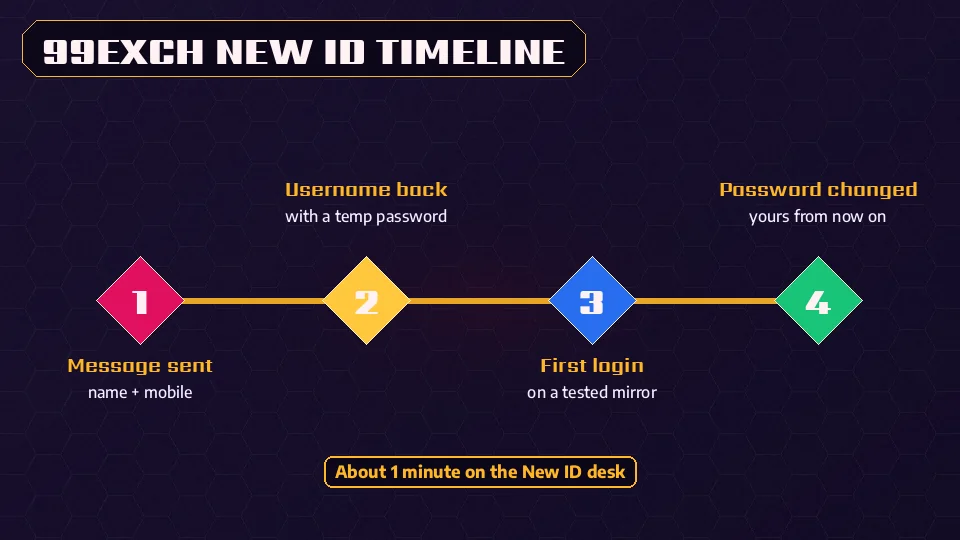
Picture the 99Exch new ID process as a stopwatch rather than a checklist. It starts when your first message lands on the New ID desk and stops when the temporary password has been swapped for your own, and the stretch in between usually comes in at about a minute. Sixty seconds, give or take. No email check sits in the middle, and no upload either.
- 0sYou send your name and mobile number to the New ID desk.
- ~30sThe desk replies with a 99Exch username and a temporary password.
- ~60sYou sign in for the first time on a working 99Exch address.
- NextYou replace the temporary password with one only you know.
Those times are typical, not a promise. On a busy evening the 99Exch reply can take a little longer, and sending the same request three or four times in a row does nothing to speed it up, because someone at the desk still has to read each message before a username goes out.
The four nodes above are the whole job. Step one and step four are yours. The middle two belong to the 99Exch desk, and that split matters later when something goes wrong, because you will know exactly which side of the chat to look at.
Why WhatsApp and not a form? A chat lets the 99Exch desk see the request, issue the username and answer a follow-up question in the same thread. You also keep a written record of the login details the moment they arrive.
99Exch New ID Number Explained Through a Real Desk Chat
Type 99Exch new ID number into a search bar and you will find plenty of people expecting a numeric ID. There isn't one. The desk sends back a username made of letters and digits, like the arjun_xxxx line in the chat below. The number worth saving is the desk's own, +91 81097 11726 (plain text here, not a link), and of the four desks behind it, listed on the 99Exch WhatsApp number page, New ID is the one that opens accounts.
Below is roughly how the chat reads. Names and digits are placeholders.
That is it. Two lines from you. The desk does not need your email, your address, a selfie or a copy of any card, and if someone claiming to be the 99Exch desk asks for an OTP, a card number or your new password, stop the chat; the 99Exch privacy page lists the only three records the desk keeps.
Quick 99Exch New ID Message Checklist Before You Hit Send
- Two lines of plain text in the 99Exch New ID chat make up the whole application.
- A +91 number that matches the SIM in the phone you are holding right now.
- Zero attachments; the 99Exch New ID chat has no use for a photo or a PDF.
Typing the the mobile number wrong is the most common slip, honestly the only common one, and it simply means the desk cannot match you later if you write in from your real number to ask about a password.
Secure First Login With Your 99Exch New ID and Temporary Password
The starter password in that 30-second reply has one job: getting you past the 99Exch sign-in card the first time. After that it is a liability. So the four moves below put the swap at the end of the very first 99Exch session, not some later day.
- Write two short lines. First name on one, the +91 mobile on the next, addressed to the 99Exch New ID desk.
- Copy the reply. Note the 99Exch username and the temporary password exactly as sent, case included.
- Sign in on a working address. Type both into the User Name and Password fields of the 99Exch sign-in card.
- Swap in your own password. Do it before that first session ends, with one that exists nowhere else.
Step three trips a few people up because 99Exch runs on more than one address, and Indian ISPs block betting domains from time to time. The same username and the same balance work on every address the desk confirms, which is why the 99Exch ID explained page treats the username, not the web address, as the thing that matters. If one address will not load, ask the desk which one is working today and use that.
Copy-paste beats retyping. Most failed first logins on a new 99Exch ID come from a capital letter read as a small one, or a zero read as the letter O.
Once the password is yours, the account is ready. Funding it is a separate step: the wallet starts at ₹100 through UPI, PayTM, PhonePe or a bank transfer, and the 99Exch deposit steps cover the method screen and what to do if a payment does not show up. Want to look around first? The sign-in card also carries a demo button with a practice balance, no deposit needed.
There is no reason to rush the deposit just because the ID arrived quickly.
Easy Fixes When a 99 Exchange New ID Request Stalls
Most 99 exchange new ID requests finish without a hitch. When one does not, it usually falls into one of four buckets, and each has a short fix.
No Reply Yet on the 99Exch New ID Desk — a Clear Next Step
Give it a few minutes before writing again. Check that you messaged the New ID desk and not one of the other three 99Exch desks; a request sitting in the Withdrawal chat waits for the wrong team.
99Exch Temporary Password Refused — the Quick Check
Paste it rather than typing it, and make sure no space came along at the end. Still refused? The Password Issue desk sends a fresh temporary one; the 99Exch login help covers that route.
99Exch Address Not Loading on a New ID — a Safe Workaround
Your username is fine. The address is blocked on your network. Ask the desk for a working 99Exch address and sign in there with the same details.
Lost the Chat With Your 99Exch New ID Details — the Fast Recovery
Write from the same mobile number you gave at the start. The desk matches you by that number, which is the main reason to give your real one.
A second account is a different question. 99Exch allows one account per person, and duplicate or shared accounts can be closed under the 99Exch terms. If you already hold a username and simply forgot it, ask the desk to find the old one rather than opening another; your balance lives on that first ID, and a new one would start from zero anyway.
Prefer to compare the WhatsApp route with the classic registration screen before deciding? The 99 Exchange sign-up page lays out both. Same ID at the end, either way.
Where the 99Exch New ID Request Starts on This Page — Clear Summary
Searches for 99exch new id, 99exch new id number and 99 exchange new id all lead to the same short process described above: a WhatsApp message to the 99Exch New ID desk, a username and temporary password in about a minute, then a password change at first login.
- The 99exch new id number people look for is the desk display number, +91 81097 11726, written as text on this site.
- A 99 exchange new id needs only a name and an Indian mobile number from someone aged 18 or over.
- Each 99Exch new id carries one username for sports, casino and cards, used on any working address.
What Changes After the 99Exch New ID Arrives — Safe Next Moves
With the 99Exch username in hand, the first job is replacing the temporary password; after that the wallet opens from ₹100, and the same New ID chat stays useful as a record of when the account was issued.
99Exch New ID Questions — Clear Answers From the Desk
How do I create a 99Exch new ID?
Send your name and mobile number to the 99Exch New ID desk on WhatsApp, display number +91 81097 11726. The desk replies with a username and a temporary password. Sign in on a working 99Exch address with those details, then change the password before you do anything else.
How long does a 99Exch new ID take to arrive?
Usually under a minute from start to finish, though the clock depends on how busy the 99Exch New ID desk is when you write. Quiet hours move fastest and evenings can drag a little. Keep the chat open instead of re-sending, and if several silent minutes pass, one polite nudge is enough.
Which documents do I need for a new 99Exch ID?
None. The 99Exch New ID desk asks for your name and your mobile number, nothing more, and you must be 18 or older. The desk never asks for card numbers, OTPs or passwords, so if anyone requests those during a new ID chat, stop replying and contact the desk directly.
Can I get a second 99Exch ID on the same mobile?
No, the 99Exch terms allow a single account for each person, and shared or duplicate logins risk closure. If the real problem is a forgotten username, the desk can trace it from the mobile you used on day one, and the existing balance comes back with it.
Why is my 99Exch new ID password not working?
Usually a copying slip: a capital letter, a zero read as O, or a trailing space. Paste the temporary password instead of typing it. If it still fails, message the 99Exch Password Issue desk, which sends a fresh temporary password, then change it at your next login.