
Registration desk · India · 18+ only
99 Exchange Sign Up — Easy Join With a Mobile Number Only
To sign up on 99 Exchange you need a +91 mobile number and a password of eight or more characters with a number in it. Currency is fixed to INR, the promo code can stay blank, and no PAN or document is asked. Your first deposit can be as small as ₹100.
Read-only practice card
99Exch Sign Up Card — Secure Start With Your Mobile
Three boxes. Only two of them need you. This 99Exch card copies the top of the registration tab so you can see what the real form expects before you open it, and the promo line at the bottom can stay empty without changing the account you get.
Nothing typed on this site is stored. The button opens 99exchlogin.com.in in a new tab.
Clear 99 Exchange Sign Up Form, One Entry at a Time
Six things sit on the 99Exch registration tab, always in the same order: mobile number, password, currency, promo code, a bonus choice and an age tick. You type into two of them. Currency is locked to rupees, the promo code is optional, the bonus already has a default and the tick is a single tap, which keeps the screen short, especially next to sites that open with a KYC upload before anything else.
Here is the same form laid out flat, with a pin note on each entry.
The pins matter more than the boxes. A 99Exch number that starts with 5, or one typed with a zero in front, simply will not fit the ten-digit pattern; a password made only of letters is short of the digit the rule asks for. Two small slips.
A worked example helps. Say your number is written on a card as 098765 43210. On the 99Exch form you drop the leading zero and the space and type 9876543210, because +91 is already printed in front of the box; typing 09876543210 makes it eleven digits and the entry will not be accepted. For the password, something like a word you remember plus two digits clears the rule, while a word alone does not.
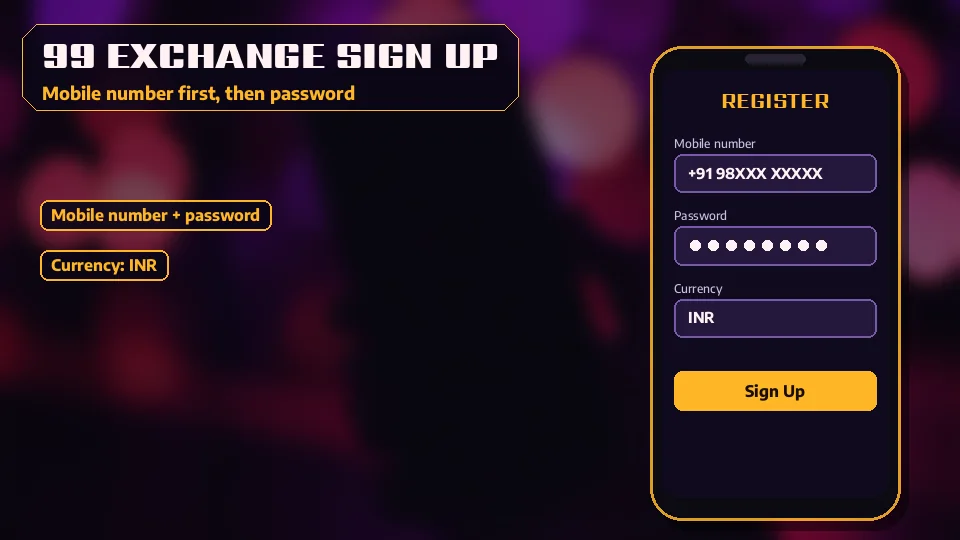
If you prefer a checklist to a picture, the table below lines up each entry with what to type and the mistake people tend to make on it.
| Entry | What to type | Common slip |
|---|---|---|
| Mobile number | Ten digits after the fixed +91 | Adding 0 or +91 again, so the count goes past ten |
| Password | Eight or more characters, at least one number | All letters, no digit |
| Currency | Nothing; INR is set | Looking for a dropdown that has a single option |
| Promo code | Your code, or leave it empty | A stray space before or after a pasted code |
| Bonus | Sports, Casino rooms or No bonus | Leaving Sports on without meaning to |
| Age tick | One tap to confirm 18+ | Missing it at the very bottom |
One thing the table cannot show: the form on this site is a rehearsal. When you press the 99Exch button, the details stay in your browser and the official registration point, 99exchlogin.com.in, opens in a new tab, where the actual 99Exch account is issued.
What you see on that tab is a short row of WhatsApp desks rather than another long form: New ID, Deposit Issue, Withdrawal and Password Issue. For registration you tap New ID. The other three come into play later, once there is a username to deposit into, withdraw from or recover, so there is no need to touch them on day one.
99Exch Register by WhatsApp — Quick Name and Mobile Route
Prefer typing to a person? 99Exch also opens accounts by chat, and that route skips most of the form: there is no password to invent before you start, no currency line and no promo box to puzzle over. The New ID desk at +91 81097 11726 handles it, shown on this site as text only; see where the 99Exch WhatsApp number and its desks are set out.
Every reply in that chat, in order, is laid out on the 99Exch New ID page for the one-minute chat. What matters here is the part people ask about most. The code.
That exchange is shortened and the the details are masked, but the shape is right: on the WhatsApp route, 99Exch does not hold your account behind a one-time code. People who stare at their SMS inbox for ten minutes are usually waiting for something that was never coming. A login OTP appears only later, and only if 2FA has been switched on inside the account (the 99Exch login page on passwords and OTP covers that switch).
Which route is faster? Hard to say in general. The form suits someone who already has the 99Exch tab open; the chat suits someone who would rather type two lines to a person and let the desk do the rest.
One step is the same on both routes. If the 99Exch desk issued a temporary password, change it the first time you log in, before you deposit anything. It takes a few seconds, and it means the only password that opens your wallet is one you chose yourself rather than one that sits in a chat history. Do it once. Then forget the temporary one existed.
Free 99Exch Account Create — No PAN, No Upload
No PAN card at sign-up. 99Exch asks for no document, no photo and no address proof when you create the account. A mobile and a password on the form, or a name and a mobile on WhatsApp: that is the full list.
This surprises people who arrive from sites that ask for a scan before the first screen. Here the 99Exch account create step is short on purpose, and it is free: nobody asks for money to open the ID, and the wallet stays at zero until you decide to fund it.
- Asked: an Indian mobile number with +91
- Asked: a password of your own, on the form route only (the chat route hands you a temporary one)
- Asked: confirmation that you are 18 or older
- Not asked: PAN, Aadhaar, bank statement or selfie
- Not asked: an OTP, a card number or a payment to register
Two house rules still apply, and both are short. One account per person, so a second 99Exch ID on the same name can be closed under the 99Exch terms on duplicate accounts; and the desk keeps only a few records from your chat, which the 99Exch privacy page lists. Clean and small. That same page notes the desk never asks for an OTP, a card number or your password, so a message demanding any of those during sign-up is not from 99Exch.
In practice the mobile number is the anchor of the whole 99Exch registration, since the desk ties your request to it, so use a number that is yours and that you will still have next month rather than a spare SIM that may lapse before your first withdrawal request.
99Exch Sign Up Bonus Choice Made Clear — Sports, Casino or None
Near the bottom of the 99Exch form sits a three-way choice, and Sports is already selected when the screen loads. That default is the one people skip past without reading.
- Sports first-deposit 5%
- The pre-selected option. The 5% special is tied to a first deposit of ₹5000, as the Welcome to 99Exch page on the first-deposit offer sets out.
- Casino rooms
- Picks the casino side instead of sports. Ask the 99Exch desk for the current terms before you deposit, since this page does not list them.
- No bonus
- A plain balance with nothing attached. The deposit you make is the amount you see.
Here is where a small number changes the picture. A first deposit of ₹100, the floor for 99Exch, sits far below the ₹5000 mark the sports offer refers to, so for a person starting small the default may do nothing at all, and switching to No bonus simply keeps the wallet easy to read from day one.
That is arithmetic, not advice. If you plan a larger first deposit and want the sports offer, leave the default on; if you came for teen patti or roulette, the casino option is the one to ask about. Either way the choice is made on the sign-up screen, so it is worth a second look before the 18+ tick.
99Exch Sign Up to First Deposit — Fast Wallet Start
An ID with an empty wallet is only half finished. Once the 99Exch username works, money can come in from ₹100.
- ₹100minimum deposit
- ₹100minimum withdrawal
- 4ways to pay: UPI, PayTM, PhonePe, bank
- 24x7desk for deposit issues
The full deposit screen, the UTR step and payout timings belong to the 99Exch deposit page, so here is just the link between the two jobs. You register, you log in with the username, you change the temporary password if the desk gave you one, and then the wallet tab takes a method and an amount.
A typical first evening. Someone in Pune registers on 99Exch at 10 pm, picks No bonus, logs in and sends ₹100 by UPI. The balance does not show at once, so the UTR goes to the Deposit Issue desk on WhatsApp, and the wallet updates after that.
Small first amounts are normal on 99Exch. One sensible approach is to send the minimum just to see the whole loop work, deposit in and a ₹100 withdrawal out, before trusting the account with more; nothing in the sign-up forces a bigger number on you.
Play 99 Exch Sign Up Online — Website or App, Same Verified ID
A play 99 exch sign up search usually comes from someone holding a phone and wondering whether they need an app first. They do not. The 99 exch sign up online route works in any mobile browser or on WhatsApp, and the app only matters after the username exists.
99Exch Sign Up in the Browser — Easy on Any Phone
Android or iPhone, the registration happens on a web page or in the desk chat. iPhone users stay in the browser afterwards too, with a shortcut added to the home screen.
99Exch Register First, Then the APK — Fast Return Visits
The Android APK sits behind the Download .apk button on the sign-in card. Install it after the ID is issued and log in with the same username; the steps are on the 99Exch APK install page.
One wrinkle for anyone registering from a a link a friend forwarded: that address may not open on your network at all, since Indian providers block betting domains now and then. The sign-up is not lost. An ID created on one 99Exch mirror carries its username and balance onto whichever mirror the desk names as open that day. Annoying, yes.
So a sign-up made on one address is not tied to it. If the page you registered on stops loading next week, ask the desk for a working address and log in there with the same details; the 99Exch ID page on what one username covers explains why sports, casino and cards all sit under that single login.
The play99 spellings follow the same logic. Someone who first heard of the exchange through a play99 address can register exactly as described here, because the username is not stamped with the domain it came from; the play99 probe results on Play 99 Exchange record what those addresses showed in our 9 Oct 2026 check.
99Exch Sign Up Errors and Reliable Fixes
Most failed attempts trace back to five or six small things. Here they are, symptom first.
Symptom → what to do on 99Exch
No OTP arrived → none is sent at sign-up; the username and temporary password come in the desk chat.
Mobile refused → ten digits after +91, starting with 6, 7, 8 or 9, no zero in front.
Password refused → reach eight characters and include at least one number.
Registration tab blank → that domain may be blocked by your provider today; the desk names one that opens, and the new ID works on every mirror.
Button seems dead → scroll to the very bottom of the 99Exch form; the 18+ tick sits under the bonus pick and is easy to miss on a small screen.
Promo code not accepted → clear the line and register without it; ask the desk about the code afterwards.
Two IDs by mistake → tell the desk; one account per person is the rule.
The OTP line deserves one more sentence, because it causes more confused messages than any other: 99Exch registration on this route hands over credentials in a chat rather than through a text-message code, so a missing SMS is not a fault, and waiting longer will not change it.
If none of the rows fit, write to the 99Exch desk at +91 81097 11726 and say exactly where the form stopped. A screenshot helps. A vague "not working" probably costs you a round of questions first.
That promo row is the one people overthink. A code copied out of a screenshot often carries a lookalike character, so retyping it by hand is the first thing to try; if 99Exch still refuses it, press on without it, finish the registration and raise the code in the same desk chat that issued your username, where somebody can check it against the account.
99 Exchange Sign Up Begins at the Card Under the Banner — Easy Entry
On this page the 99 exchange sign up starts at the read-only card right after the banner, then continues on 99exchlogin.com.in, where the 99Exch form takes a +91 mobile, a password with a number, the locked INR currency, an optional promo code, a bonus pick and the 18+ tick.
99Exch Register Spellings That Land Here — Clear Meaning
People type the same request several ways, and each one below means the registration covered in the form section above:
- 99exch sign up, written as one word, for the mobile-and-password form
- 99exch register, the same job phrased as a verb, often typed by Android users
- play 99 exch sign up, used by people who first met the play99 addresses
- 99 exch sign up online, when the question is whether an app is needed (it is not)
99Exch Account Create Over the Desk Chat — Quick Two-Line Request
A 99exch account create request on WhatsApp needs a name and a mobile number only; the New ID desk answers with a username and a temporary password, and no PAN or upload is asked at any point.
Play 99 Exch Sign Up Online on Any Working Address — Safe Same Login
Whichever 99Exch mirror you register on, the username and balance follow you to every other working address the desk confirms, and the Android APK uses that same login once installed.
99 Exchange Sign Up Questions — Genuine Answers
How do I sign up on 99Exch?
Open the 99Exch sign up card, enter a 10-digit +91 mobile and a password of eight or more characters with a number, leave INR as it is, add a promo code only if you hold one, pick a bonus option and tick 18+. The New ID desk then issues your username for the first login.
What documents does 99Exch ask for at sign up?
No documents at all. On the 99Exch form the only typed details are the +91 mobile and a password; on WhatsApp it is your name plus that mobile. PAN, Aadhaar, photos and bank statements are not requested at registration, and the 18+ tick is a confirmation you tap, not a file you upload.
Can I sign up on 99Exch without a promo code?
Yes. Leave the promo line empty and keep going, because 99Exch treats it as an extra rather than a gate. The bonus pick just below it is a separate setting, so skipping the code does not remove the Sports 5% option, the Casino rooms option or No bonus from the screen.
Which bonus should I pick when I register on 99Exch?
Pick the option that matches what you plan to use. Sports first-deposit 5% is pre-selected, and that 5% is tied to a first deposit of ₹5000. Casino rooms is for table players, and No bonus keeps the balance plain. Ask the desk for current terms before you deposit.
What if the 99Exch OTP does not arrive during sign up?
99Exch sign up does not rely on an SMS code. The username and temporary password come back in the WhatsApp chat with the New ID desk at +91 81097 11726. A login OTP appears only if 2FA is switched on later inside the account. Still stuck? Message the desk again.
Should I sign up on the 99Exch app or the website?
Either one gives the same ID. Register through the website or the WhatsApp desk, then log in wherever you like: the Android APK from the sign-in card, or a browser shortcut on iPhone. Username and balance stay the same on the app and on every working 99Exch address.
Is 99Exch sign up free?
Yes, registering costs nothing at all. There is no fee on the 99Exch form or in the WhatsApp chat; the first rupee moves only when you deposit, from ₹100 by UPI, PayTM, PhonePe or a bank transfer. Cash-outs start at ₹100 as well, and the 24x7 desk handles both.